The tested setup
- Date
- November 8, 2026
- Tools
- Pixel Art Lighter 3.6.0 · Laigter 1.14.0
- Engine
- Godot 4.7.2 stable
- Renderer
- Compatibility / OpenGL
- OS and GPU
- Windows · NVIDIA Quadro RTX 5000
- Input and sweep
- One 48 × 48 PNG · 13 rendered light positions
What we saw
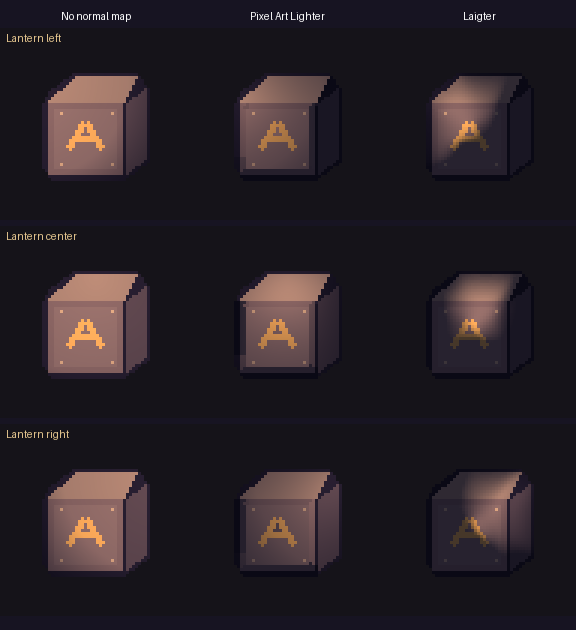
Pixel Art Lighter won on a 48 × 48 painted crate. We swept the same amber light across the unmodified sprite and both tools' default normal maps. Pixel Art Lighter kept the painted A close to the surrounding flat face and gave the right bevel a stronger response. Laigter's default threw a moving hotspot across the lettering.
What stayed the same
An original PNG depicts a beveled crate with a flat painted A. Both tools generated their default normals from that PNG, with no manual edits. Pixel Art Lighter used Generate → Apply → Export. Laigter used its Windows portable release through the command line.
Each map was applied through a Godot CanvasTexture at nearest-neighbor 3× scale. A flat control and both mapped sprites received identical amber PointLight2D sweeps over 13 rendered positions. Normal maps were the only input varied.
The measured difference
- Painted stencil versus flat face
- The mean lighting-factor gap was 0.30 percentage points for Pixel Art Lighter and 3.47 for Laigter. In this setup, the smaller gap better preserved the painted flat face.
- Right bevel, light moving left to right
- The lighting factor changed by +43.50 percentage points for Pixel Art Lighter and +27.98 for Laigter. The Pixel Art Lighter bevel responded more strongly.
How the comparison was measured
For each pixel, the lighting factor is rendered luma divided by the same pixel in the unmapped control. Comparing the stencil and background ratios removes most effects of their different source colors and the lantern's falloff.
The contact sheet shows Laigter's moving hotspot crossing the lettering and Pixel Art Lighter preserving the separation between faces. These metrics apply to this sprite and light, with default settings.
What to use them for
Try Pixel Art Lighter for a few prominent pixel sprites. Keep Laigter for command-line batches. A different sprite or tuned preset could change the result.
This trial covers normal maps only. Animated sheets, custom presets, other sprites and direct-light masks still need a separate trial. No physical Android or performance check was run for this comparison.
Sources and tool versions
Pixel Art Lighter · Laigter 1.14.0 release · Godot CanvasTexture documentation
Versions and setup above are from the recorded November 8 test, not a claim about the latest releases.